Google Analytics goals: what replaced them in GA4

Google Analytics goals no longer exist. They were a Universal Analytics feature, and Universal Analytics stopped processing hits on 1 July 2023. GA4 replaced them with events. You mark an event as a key event, and a standard property allows 30 of them, or 50 on Analytics 360.
Google Analytics goals no longer exist, and that is the entire answer to the question. They were a Universal Analytics feature, and Universal Analytics is switched off.
Most pages that still rank for Google Analytics goals describe a product that stopped collecting data three years ago. If a post tells you to open Admin and create a destination goal today, close it. What follows is what the four goal types were, what each one maps to in GA4, and which two map to nothing at all.
Which goals are available in Google Analytics now?
None. Google Analytics goals were a Universal Analytics feature, and Universal Analytics stopped processing hits on 1 July 2023. The current product, GA4, has no goals at all. It has events, and you mark up to 30 of those events as key events on a standard property.
Google’s own timeline is short. Standard Universal Analytics properties stopped processing hits on 1 July 2023. Analytics 360 properties kept running until 1 July 2024, then lost interface and API access. The goals went out with the properties that held them.
GA4 is a different model, not a renamed version of the old one. Universal Analytics counted sessions and pageviews, then let you flag some of them as goals. GA4 counts events. A page view is an event. A scroll is an event. A purchase is an event. A goal is not a separate object any more, it is a flag on an event you are already collecting.
That sounds like a small change. It is not. It moved the work from the reporting interface into the tagging layer, which is why so many accounts came through the migration with numbers nobody trusted.
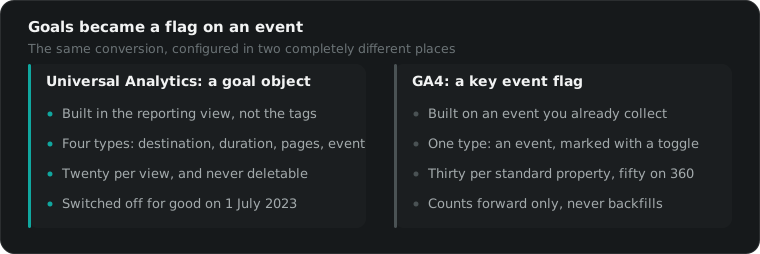
What were the four Universal Analytics goals?
Universal Analytics goals came in four types: destination, duration, pages or screens per session, and event. Destination fired when someone reached a specific URL. Duration fired when a session passed a set length. Pages per session fired on a page count. Event fired when a tracked event matched a condition you defined.
There was a fifth option, Smart Goals, which guessed which sessions looked valuable so that accounts with no real conversion could still import something into AdWords. It is gone, and nobody I know misses it.
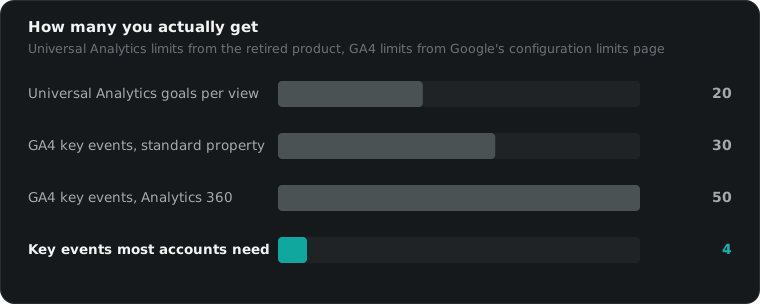
You got twenty goals per reporting view, in four sets of five, and once a goal existed you could not delete it. You could only switch it off and reuse the slot. That constraint shaped how agencies worked. Slots got burned on tests in month one and the account ran out of room by month six.
Goals were also never retroactive. Create one on a Tuesday and it counted from Tuesday. Everything before it stayed uncounted forever. That has not changed in GA4, and it is still the mistake people make the week after a campaign launches instead of the week before.
What replaced Google Analytics goals in GA4?
Google Analytics goals were replaced by key events. In GA4 you collect an event, then mark that event as a key event, and it starts counting from that moment. Google first called these conversions, then renamed them key events, so that the word conversion now means the number Google Ads reports.
Here is the mapping, goal type by goal type.
| Universal Analytics goal | What it did | GA4 equivalent | How close |
|---|---|---|---|
| Event | Fired when a tracked event matched | Mark that event as a key event | Exact |
| Destination | Fired on a specific URL | Custom event built from page_view plus a page_location condition | Close, more setup |
| Duration | Fired past a session length | Nothing. Engagement time is a metric you read, not a trigger | Poor |
| Pages or screens per session | Fired on a page count | Nothing. Engaged sessions is the nearest metric | Poor |
| Smart Goals | Guessed a valuable session | Removed | Gone |
Two of five map cleanly. Two map to nothing. One was deleted. That is the honest score.
An engaged session in GA4 is a session that lasts longer than ten seconds, or fires a key event, or has at least two page views. It is a number you read in a report. You cannot trigger anything from it. So if a duration goal was quietly feeding a Google Ads bid strategy on one of your accounts, that signal stopped in July 2023 and the bidding carried on regardless.
How do you set up key events in GA4?
Open Admin, then Events. If the event already fires, toggle the key event switch beside it. If it does not fire yet, use Create event to build one from an existing event and a condition, then mark the new event. A standard property allows 30 key events, and Analytics 360 allows 50.
That single toggle does the job Google Analytics goals used to need a whole configuration screen for. The interface steps take two minutes. The decisions around them take longer.
- Name the event before you build it. Event names are permanent in practice and a property full of
submit_1,submit_newandsubmit_finalis unreadable within a quarter. - Build it in your tag manager where you can. The Create event screen inside GA4 is convenient and limited. Anything that needs a value, a currency or a deduplication ID belongs in the tagging layer.
- Mark it, then wait a day. Key events count forward only. Marking a Tuesday event does not backfill Monday.
- Check it against the platform, not against itself. GA4 says forty purchases and Shopify says thirty one. The one attached to money is right.
Google’s own instructions for marking events as key events and the configuration limits page are worth reading directly. They are short, and they are the only source that stays current.
Three or four key events is enough for almost any account. Purchase or qualified lead, add to cart or form start, and one signal further up. Everything else is a report, not a decision.
Which Google Analytics goals have no GA4 equivalent?
Duration goals and pages per session goals have no GA4 equivalent. Neither converts into a key event, because GA4 triggers on events rather than on the shape of a session. Smart Goals were removed outright. If any of those three fed a bid strategy, that signal ended when Universal Analytics stopped processing data.
You can fake the first one. A timer trigger in Google Tag Manager fires a custom event at sixty seconds, you mark that event, and now you have something that looks like a duration goal. I have built it for clients who insisted.
It is still a bad idea to bid on it. Time on page rewards confusion as reliably as it rewards interest, and an algorithm optimising toward it will find you the cheapest people who scroll slowly. If you need a signal for the top of the funnel, use something a person chose to do: a video completion, a size guide opened, a store locator used.
The deeper point is that the goal was never the measurement. It was a label on a session. What actually decides whether your reporting is any good is the advertisement tracking underneath it, and whether the event reaches the ad platform at all.
What we do about it
We treat Google Analytics goals as history and build the measurement around the ad platforms instead. GA4 gets three or four key events that matter, the platform pixels and server side events carry the bidding signal, and the two numbers get reconciled once a week rather than argued about every morning.
That order matters. GA4 is a reporting tool now, not the source of truth for bidding. Meta optimises on what Meta receives. Google optimises on what Google receives. A perfect GA4 property attached to a broken Conversions API setup will still waste your budget, politely and with clean dashboards.
If GA4 is the wrong tool for what you need, the honest options are covered in our post on picking a Google Analytics alternative. Most accounts do not need one. They need three events that fire reliably.
You can see exactly what we charge before you speak to anyone, including the percentage at your spend level. If you would rather just ask whether the old Google Analytics goals on your account ever got rebuilt properly, 15 minutes is usually enough to tell.
Questions people actually ask
Which goals are available in Google Analytics in 2026?
None. Goals were a Universal Analytics feature and Universal Analytics stopped processing hits on 1 July 2023. GA4, the current product, has no goals. It collects events, and you mark the important ones as key events. A standard property allows 30 key events and an Analytics 360 property allows 50.
What were the four Universal Analytics goal types?
Destination, duration, pages or screens per session, and event. Destination fired when a visitor reached a set URL. Duration fired when a session passed a length you chose. Pages per session fired on a page count. Event fired when a tracked event matched conditions you set. A fifth option, Smart Goals, guessed which sessions looked valuable.
How do I recreate a destination goal in GA4?
In Admin, open Events, then Create event. Build a new event from page_view with a condition on page_location matching your thank you page URL. Save it, then mark the new event as a key event. It counts from the moment you create it, never retroactively, so build it before the campaign launches, not after.
Is a key event the same as a conversion?
Almost. GA4 originally called these conversions, then renamed them key events, so that the word conversion means the number Google Ads reports. You can still build a Google Ads conversion from a GA4 key event and bid on it. The two numbers will not match exactly, because the attribution windows and models differ.
Can I get duration goals back in GA4?
Not properly. GA4 has no trigger for session length, only engagement time as a metric you read in reports. The nearest workaround is a timer trigger in Google Tag Manager that fires a custom event after sixty seconds, which you then mark as a key event. Do not let a bid strategy optimise toward it.
How many key events can a GA4 property have?
Thirty on a standard property and fifty on Analytics 360, according to Google's own configuration limits. Universal Analytics allowed twenty goals per reporting view. In practice most accounts need three or four real key events, and the properties that hit the limit are usually counting things nobody makes a decision from.