Social media management tools: what they cannot do

Social media management tools schedule posts, route approvals, pull comments into one inbox and build reports. They do not make content or change reach. Instagram caps API published posts at 100 per rolling 24 hours and will not attach shopping tags, so some of the work stays manual whichever tool you buy.
Social media management tools are the easiest software purchase in marketing to justify and the hardest to feel. They tidy the work. They do not change whether the work is any good.
14 years of running paid and organic side by side, and I have never once seen a scheduling tool move a business number. I have seen plenty of them save an afternoon a week.
What do social media management tools actually do?
Social media management tools schedule posts, hold them for approval, pull comments and messages into one inbox, and build reports. They do not make the content and they do not change reach. Everything they publish goes through a platform API, so the API decides what is possible, not the tool.
That last point is the one nobody sells you on. A suite is a wrapper around Meta’s, TikTok’s and LinkedIn’s own publishing endpoints. When a platform adds a format, the tools get it late. When a platform restricts something, every tool loses it on the same day.
The four jobs are worth naming plainly. Queueing content. Getting sign off before it goes live. Handling replies. Reporting across platforms without four exports.
Only two of those are hard problems. Approvals and the inbox. The other two are convenience.
Is social media scheduling worth paying for?
Only above about four accounts or three people. Meta Business Suite schedules Instagram and Facebook for nothing, and TikTok and LinkedIn both schedule natively. Paid scheduling earns its money when someone has to approve a post before it goes out, or when one person covers six brands at once.
Below that, a paid seat is buying you a nicer calendar. The calendar is not the constraint. Content is.
The failure I see most often is a well organised queue of mediocre posts. A tool makes it very easy to fill four weeks with things nobody would stop scrolling for, and the tidiness hides the problem for a quarter.
There is also a real risk in the convenience. Cross posting one asset to four platforms with one caption is a single click in every suite, and it is the single most common cause of flat organic performance we inherit. A vertical video cut for TikTok is not a LinkedIn post.
Approvals are the exception, and they are worth naming properly. On regional accounts a post often has to clear a brand manager, a legal reviewer and an Arabic copy check before it goes out, sometimes across two time zones. Social media management tools that track who approved which version save real arguments, and screenshots in a group chat do not.
What will the API not publish for you?
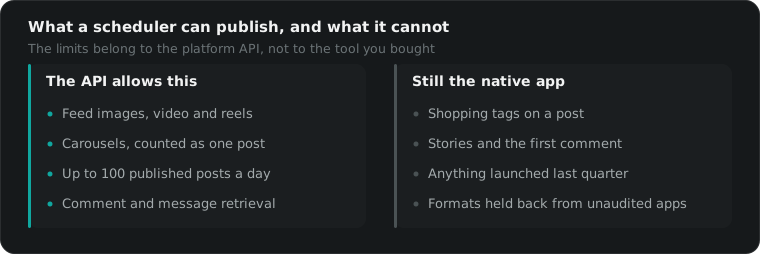
More than the sales page suggests. Instagram caps API published posts at 100 in any rolling 24 hours, accepts JPEG images only, and will not attach shopping tags. TikTok restricts posts from unaudited apps to private viewing until the developer passes an audit. Those limits belong to the platform, not to the tool.
Meta documents this itself in the Instagram content publishing reference, including the detail that a carousel counts as one post against the limit, and that media has to sit on a publicly reachable server at the moment of publishing.
TikTok’s Content Posting API is stricter again. Until the app that publishes on your behalf has passed TikTok’s audit, its posts are held to private viewing. That is a property of the tool’s developer status, not of your account, and no vendor puts it on the feature list.
So keep the native app open regardless. Stories, first comments, shopping tags, and anything the platform launched in the last quarter usually have to go through it.
This is also why a queue can fail quietly. A token expires, a permission gets revoked when someone leaves the business, or an image is not JPEG, and the post simply does not go out. Check the account itself once a week rather than trusting a green tick in a dashboard.
| Job | Native tool | Paid suite | Who should pay |
|---|---|---|---|
| Scheduling Instagram and Facebook | Meta Business Suite, free | Same, plus one calendar view | Four or more brands |
| Scheduling TikTok | Native scheduler, free | Works, inside API limits | Teams needing approvals |
| Stories and first comment | Native app, reliable | Partial, varies by API | Nobody, do it in the app |
| Comment and DM inbox | Separate per platform | One inbox, genuinely better | Anyone with real volume |
| Approvals and client sign off | Does not exist | The actual product | Agencies, regulated brands |
| Reporting | Native insights, free | Cross platform, own maths | Anyone on four platforms |
Which social media management tools do we keep open?
Meta Business Suite, the native TikTok and LinkedIn schedulers, a shared calendar in a spreadsheet, and one paid suite on the two accounts with an approval chain. Across the whole agency that is under $150 a month. On single brand accounts we use no paid social media management tools at all.
What we cancelled is more useful. A hashtag research subscription, because hashtag reach on Instagram has been a rounding error for years. A link in bio product, because the platforms added link stickers. A second listening tool nobody opened after the trial.
Before you buy, run the same test we do. Take the last month of work and count the hours that a tool would actually remove. If it is under four, the seat is not paying for itself, whatever the annual discount looks like. Most social media management tools are sold against a workflow nobody in the room has yet.
Community management is the one place we would pay more, not less. A unified inbox that actually shows Arabic and English threads side by side, with assignment and a reply history, is worth a seat on any account doing volume in the Gulf. Most suites handle Arabic threads poorly, and a few still break the text direction in replies.
What does the social media reporting actually prove?
Less than it looks. A suite reports what it can pull from each API, then averages it into an engagement rate of its own invention. Native insights and the suite will disagree on the same week, sometimes badly. Use the report to spot a direction, and the native app to settle any argument about a number.
None of it proves revenue. Organic social reporting counts impressions, engagements and follows, and none of those pay a supplier. Connecting social to money needs the same work as everything else, which is the tracking layer covered in our post on digital marketing tools.
The honest version we give clients is this. Organic social is measured on output and consistency. Paid social is measured on cost per purchase. Mixing the two reports lets a bad quarter hide behind a good follower chart.
One more thing about the numbers. Suites backfill history only as far as each API allows, so a tool you installed in March cannot show you last January. Export your native insights before you switch vendors, because nobody else is keeping that record for you.
What do we do instead?
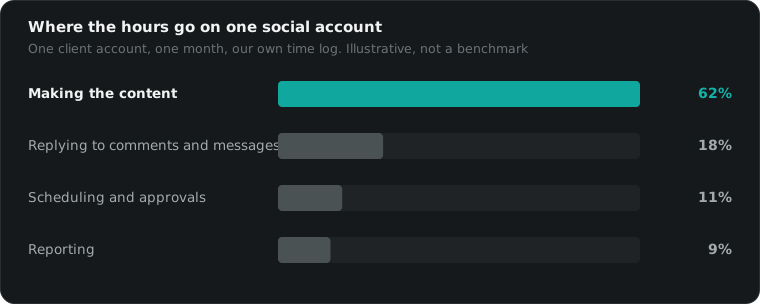
We spend the tool budget on making more content. On the accounts we run, the number that moves is how many pieces get made each week, not how neatly they are queued. A calendar, a shared drive and a Friday review beat any paid suite under about six brands.
That is the awkward advice, because a subscription is easier to approve than a videographer. The subscription is also the one that never showed up in a result.
If you are picking a stack, the same logic runs through the email marketing software decision. Our paid media fees are published in full, starting at $1,095 flat under $2,500 of monthly spend, then a marginal rate stepping 10, 9 and 8 percent, landing at 10.4 percent all in at $50,000. And if you want a straight answer on whether your social media management tools are worth the seats, 15 minutes will tell you.
Questions people actually ask
Do social media management tools reduce your reach?
There is no documentation from Meta or TikTok saying scheduled posts are demoted, and we have never been able to measure a difference on accounts where we tested both. What does hurt reach is posting the same file to four platforms at once with one generic caption, which is exactly what a scheduler makes easy.
Is Meta Business Suite enough?
For one brand on Instagram and Facebook, yes. It schedules, it holds drafts, it shows comments and messages in one inbox, and it costs nothing. You outgrow it when you need approvals from someone outside the business, or when you are managing four or more brands across more than two platforms.
What can a scheduling tool not publish?
It depends on the API, not the tool. Instagram publishing accepts JPEG images only, refuses shopping tags, requires media on a publicly reachable server, and allows 100 API published posts per rolling 24 hours. TikTok restricts posts from apps that have not passed its audit to private viewing. Stories and first comments vary by platform and change often.
How many people does it take to run four social accounts?
One person can schedule and report on four accounts. One person cannot also make enough content for four accounts, and that is where every setup falls over. Budget for making the work first, then buy the tool that saves the smaller half of the job.
Why does the tool's engagement rate differ from native insights?
Because each platform exposes different metrics, and every suite builds an engagement rate out of what it can get, using its own formula and its own denominator. Neither number is wrong. Use the suite for trend direction and the native app whenever anyone needs a figure they will be held to.